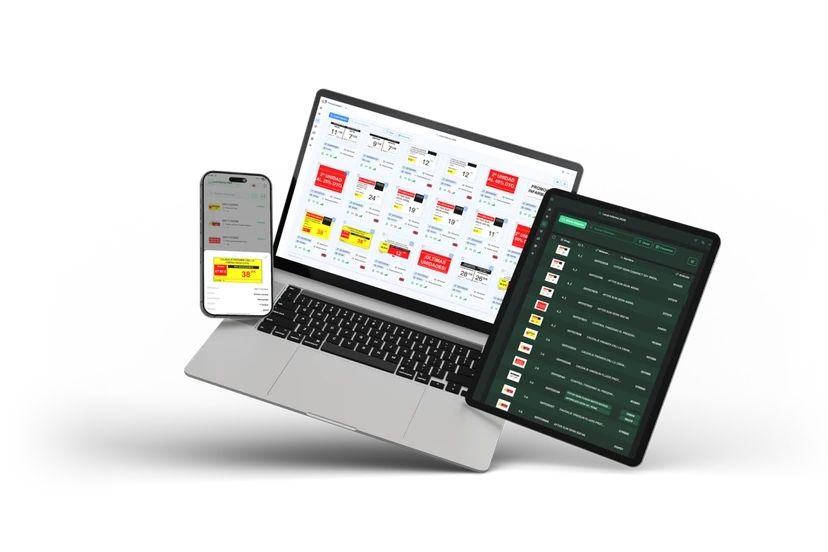
This guide is for people who run a pharmacy in Spain and wonder whether it pays off. It is not about a brand in the abstract: it explains which part of your range really benefits, where the rules leave you free and where they do not, and what to settle before asking for a quote. The general definition of the technology, not tied to pharmacy, is in what electronic shelf labels are and how they work. If you already want the commercial offer, see the page on electronic shelf labels for pharmacy.
Why a pharmacy is not a supermarket with smaller labels
Spain had 22,273 community pharmacies at the end of 2025, according to the report of the General Council of Pharmacists' Associations. That number is spread across many small shops, and in a small shop the person who changes prices is often the one serving at the counter. A system that needs its own technician has no place there.
The second feature is less obvious. Behind the same counter sit three kinds of product with different pricing rules, and almost everything said about shelf labels in pharmacy depends on understanding that difference. A supermarket sets its prices and changes them whenever it likes; a pharmacy sets some, administers others and merely displays those set by third parties.
In practice, the benefit of an electronic label is not spread evenly across the range. It concentrates where there is a pricing decision and, above all, where there is movement: promotions, supplier price changes, seasonal campaigns.
Parapharmacy, free-price and reimbursed medicines
"Parapharmacy" is the Spanish trade term for the non-medicinal health and beauty range sold in pharmacies: dermocosmetics, supplements, hygiene, baby care. Three blocks are worth separating, because the label does a different job in each.
| Block | Who sets the price | What the label does | How often it changes |
|---|---|---|---|
| Parapharmacy and dermocosmetics | The pharmacy | Shows the price and the promotions you decide | High |
| Non-reimbursed medicines (including those advertised to the public) | The laboratory, with a notified or free price; the pharmacy may have room for discounts on advertised ones | Shows the current price and, where relevant, the discount | Medium |
| Medicines reimbursed by the National Health System (SNS) | The authorities | Shows a price you cannot change | Low, with periodic reviews |
Parapharmacy: where the movement is
Here you set the price, and that is exactly what makes paper hard work. The same product may change cost with the supplier, enter a two-week promotion, leave it and, if nobody checks, still carry the offer sign. That gap between the shelf and the till is what annoys customers most and what costs the team most time to fix.
Consumer rules weigh more in this block. Two of them bear directly on the sign:
- Selling price and unit price. Royal Decree 3423/2000 requires the selling price on every product offered to consumers and, in addition, the price per unit of measure on those sold by declared quantity or by pieces. Both must be unambiguous, legible, in the same field of view and visible without the customer having to ask (arts. 3 and 4). A 50 ml cream or a 30-day collagen needs both prices. There are exceptions, such as when the two prices are identical or the products listed in Annex I.
- Showing the reduction. Article 20 of the Retail Trade Act (Ley de Ordenación del Comercio Minorista), as amended by Royal Decree-Law 24/2021 and applicable since 28 May 2022, says that when goods are offered at a reduced price the previous price must be clearly shown next to the reduced one. The previous price is defined as the lowest applied to identical products in the preceding thirty days. The duty does not apply to goods put on sale for the first time, and short-dated markdowns made to reduce food waste are left out when working out that previous price.
An electronic label does not make you compliant by itself, but it makes the task easier: it can show price, unit price and previous price at once, and stop showing the promotion when it ends. A more detailed look at how that reference price is calculated is in markdowns and the 30-day reference price on the shelf, and the pharmacy view of advertising and pricing rules is in the regulation guide.
The legal texts linked here are the Spanish originals and apply across Spain; there is no official English version. Autonomous regions may add their own consumer rules, so confirm the details with your regional pharmacists' association.
Non-reimbursed medicines: notified price and limited discounts
Medicines the National Health System does not reimburse do not have a regulated price. Article 94.4 of the consolidated Medicines Act refers to a "notified price regime" (régimen de precios notificados): the marketing authorisation holder notifies the price to the Ministry of Health, which may object on public-interest grounds. Margins and VAT are added to that laboratory price, and the result is printed on the pack.
What matters for a label is the room the pharmacy has to move. For medicines advertised to the public (known as EFP in Spain), article 4 of Royal Decree 823/2008 lets the pharmacy apply discounts of up to 10 % on the retail price including taxes, and treats the price on the pack as the maximum. In other words: you may lower it, but not raise it. If you discount EFP products, the label should show the resulting price clearly, ideally next to the previous price so that the rule on showing reductions is also met.
This is the part of the guide where I most recommend checking with your pharmacists' association. The text we cite for Royal Decree 823/2008 is the original BOE publication; before building a discount policy, look at the consolidated version and the rules of your autonomous region.
Reimbursed medicines: the label does not change the price
For reimbursed medicines the pricing decision is not yours. The same article 94 gives the Interministerial Commission on Medicine Prices the task of setting reimbursement prices, and the Ministry of Health sets the retail price by adding the authorised ex-factory price, which is a maximum, and the wholesale distribution and dispensing margins. The specific margins are in Royal Decree 823/2008.
So does it make sense to put electronic labels on them? It depends on how each pharmacy displays them. Most of these medicines are dispensed from behind the counter and the customer never sees a shelf sign; a label adds nothing there. Where it can help is on self-care products displayed in a self-service area, or to keep a consistent look across a whole section. It is a display decision, not a technology one, and there is no universal answer.
One more caution. Royal Decree 3423/2000 leaves medicines outside its general rule and refers to their specific regulation, so what was said above about unit price does not apply to them automatically.
How an installation works, without jargon
A complete installation has four parts, and knowing them helps you ask the supplier better questions.
- The labels. E-paper displays that use power only when what they show changes. That is why batteries last years. FarmaConnect publishes on its website models with a four-colour screen, NFC and a seven-colour LED, with an average battery life of up to 10 years depending on use (6 years on the 1.54-inch model).
- The base stations. They receive the data and send it by radio to the labels. How many you need and where they go depends on the floor area and obstacles; it is one of the points studied during the visit.
- The management platform. The software that decides what each label shows, links each one to its product and records when it was updated.
- The link to your pharmacy software. This is what avoids double work. If you change the price in the program you already use, the platform picks up the change and sends it.
That fourth part is the one that most often shapes the decision, because the Spanish market for pharmacy management software is varied and not every package connects the same way. The detail of each case is in the hub on integrations with pharmacy software. For an introductory guide, remember the rule: before signing, ask the supplier to confirm in writing whether your software is compatible and how the connection is made.
What a price change looks like
When the flow works well, it is almost boring. You change the price in your software, the platform receives it, converts it to the label format and updates the label. Meanwhile the till already charges the new price, and the gap that used to force a manual walk along the shelves disappears.
The value lies in what you no longer have to do: print, cut, swap the sign on the right shelf and remove the old one. FarmaConnect describes this flow on its product page as the change arriving "in seconds", but you should see that working in your own shop before accepting it. The same goes for any supplier.
Real benefits and honest limits
Brochures cover the first part. The second part is what tells you whether the investment fits your shop.
What usually improves
- Consistency between shelf and till. The most repeated complaint in testimonials from pharmacies that made the switch; see the pharmacy case studies for their exact words.
- Team time. Fewer hours spent printing and placing signs. How much you save depends on the volume of changes; in some pharmacies it is a lot and in others it barely shows.
- Promotions that end on their own. An offer that finishes on Sunday disappears on Sunday, without relying on someone remembering on Monday.
- Extra information. Some labels include NFC so customers can look up product details on their phone, or internal alerts for staff (rotation, expiry, stock) synchronised with the software. These features depend on the model and the integration.
What it does not do
- It does not raise sales by itself. A clear price and a visible promotion help, but the effect on sales depends on range, placement and pricing policy. Any uplift figure without a source and context should be treated with caution.
- It does not fix a messy product master. If the software holds duplicate products, wrongly linked codes or outdated prices, the label will display them just as accurately. Clean that data before installing.
- It does not make equal sense for every product. Items dispensed without being displayed do not need a label.
- It does not exempt you from the rules. As seen above, the law dictates which data to show and how; the label is only the medium.
What to decide before asking for a quote
A label quote without this information usually ends in a second round of figures. These are the decisions worth having at least sketched.
1. Which areas get labels. Most commonly you start with parapharmacy and dermocosmetics, where promotions concentrate, and extend later. If your pharmacy sells many refrigerated products, there are models for fridges; FarmaConnect lists on its website the K-266-C and K-350-C, rated from −25 to 10 °C.
2. How many labels and what size. Size decides what fits: a small label takes a large price and a short name; a larger one can show the full name, unit price and previous price. Since the unit-price and markdown rules require several data points, make sure the chosen models can show them all.
3. How it connects to your software. Ask which data travels (price, name, code, promotion, stock), how often, and who resolves incidents if something fails.
4. Who maintains the system. Installation, software and support may be included or bought separately. Ask also what happens if a label fails and how long a replacement takes.
5. How it is paid for. Purchase, rental or subscription. FarmaConnect states it works with a monthly 60-month rental fee that includes installation, software and support, with no public figures: the amount is quoted according to the number of labels. For a cost comparison, with the items to add up and those usually forgotten, see the page on the price of electronic shelf labels for pharmacy.
How rollout works in practice
The steps are similar with any serious supplier, although timelines vary and we do not give them because we have no publishable data of our own.
- Initial video call or visit. The size of the shop, the management software and the product volume are reviewed. This is the moment to raise integration doubts.
- Proposal. Number of labels, models, base stations and commercial terms in writing.
- Data preparation. Check that the codes in the software match the products. This is where duplicates come to light.
- Installation. Base stations are placed, each label is linked to its product and mounted on the rails.
- Test. Before accepting the system, change a price and check how long it takes to show and whether till and label agree. Test with real products, including a promotion with an end date.
- Brief training. It is not usually long if the price-change workflow stays the same, but the team must know what to do when a label shows a warning.
A common-sense recommendation: do not start with the whole pharmacy at once. A pilot in one section reveals problems at low risk and lets you decide with data whether to extend.
What pharmacies already using them say
FarmaConnect collects video testimonials from pharmacists on its case-studies page. What repeats most are not percentages but phrases: an always-visible price stops customers walking to another pharmacy, the fee "pays for itself", or the end of complaints about wrong shelf prices, in one case after several years of use. They are opinions, not studies, and should be read that way. If you want to hear how they put it, and what reservations are voiced by those who had a poor first experience with another system, see the pharmacy case studies.
When it is not worth it, or not yet
Sometimes the sensible move is to wait.
- If you change few prices a month. With a very stable range and little promotion, the time saved will be small and the argument becomes a different one (image, consistency).
- If your management software cannot be connected. Without integration, the label forces you to maintain prices in two places and the main benefit is lost.
- If the product master is untidy. Fix that first.
- If you only want to comply with a rule. The rules can be met with well-made paper; the electronic label is a more convenient means, not a requirement.
Questions to ask any supplier
- Is my management software on your compatibility list? Can you show it with a live change?
- How is a label updated and how long does it take on average?
- Which data can each model show (price, unit price, previous price)?
- What does the fee include and what is left out?
- What happens if a label fails or if I want to expand?
- Can I speak to a pharmacy that already uses it with my same software?
- What happens to my data and to the hardware if I stop paying or stop working with you?
What next
For an informed decision you need three things: a list of the areas you want to cover, confirmation that your software can connect, and a comparable written quote. If you already have them, the useful next step is a demonstration with your own products.
If you would rather see the product and its models and book a video call, the commercial page is electronic shelf labels for pharmacy. For the rest of the path, the guides page arranges the others by topic.
This guide summarises official sources and does not replace legal advice or that of your professional association. The rules cited were consulted in the BOE on the date shown and may have been amended since. The legal texts linked are in Spanish.
Sources
- Real Decreto Legislativo 1/2015 (texto refundido de la Ley de garantías y uso racional de los medicamentos), art. 94: fijación de precios (BOE)
- Real Decreto 823/2008, por el que se establecen los márgenes, deducciones y descuentos de la distribución y dispensación de medicamentos de uso humano (BOE)
- Real Decreto 3423/2000, por el que se regula la indicación de los precios de los productos ofrecidos a los consumidores y usuarios (BOE)
- Ley 7/1996, de Ordenación del Comercio Minorista, art. 20: constancia de la reducción de precios (BOE)
- Consejo General de Colegios Oficiales de Farmacéuticos: farmacéuticos colegiados y farmacias comunitarias 2025
- Universitat de Barcelona (Unitat d'Història de la Farmàcia, Legislació i Gestió Farmacèutiques): regímenes de precio de los medicamentos